


TradingView integration with Vault Markets
Vault Markets brings TradingView-powered charts and technical analysis tools into your trading experience. Explore price movements, compare markets, and develop your analysis in one trading workspace. When you’re ready, place and manage trades through your Vault Markets account.
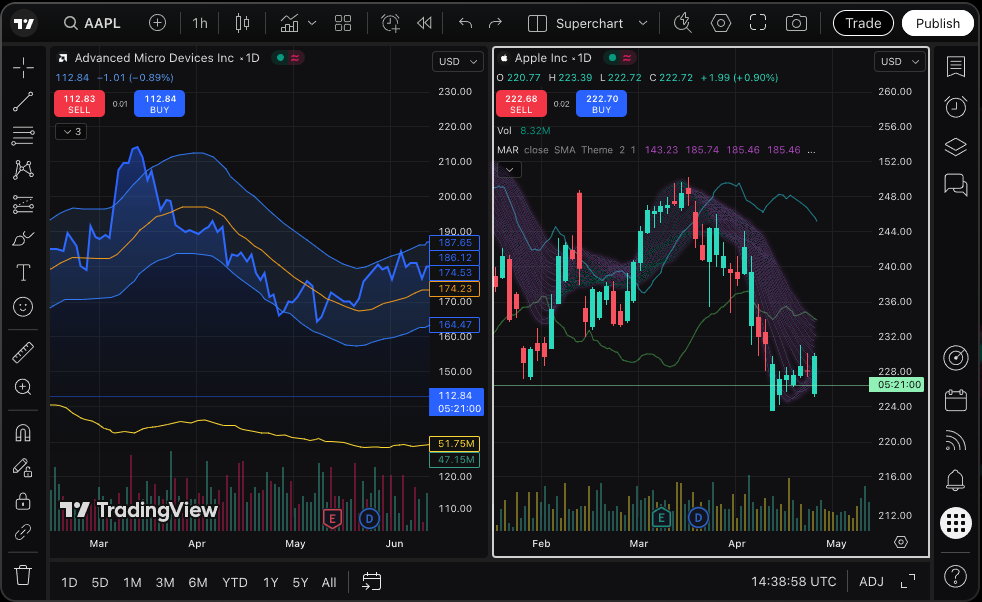
For illustrative purposes only
The integration
Advanced charting tools at your fingertips
17 Interactive chart types
Visualise price movements using standard Candlesticks, Bars, Line, or specialized Renko and Heikin Ashi formats..
100+ Built-in technical indicators
Analyse trends, volume, and volatility instantly with tools like Moving Averages, RSI, and Bollinger Bands.
110+ Precision drawing tools
Mark key support and resistance zones, plot Fibonacci levels, and map chart patterns with precision.
Multi-chart screen views
Track and compare up to 8 live charts or timeframes simultaneously in a single, synchronised window.
Trade directly from your charts
Open an order ticket from your chart and place and manage trades through your Vault Markets account.
Chart features
Explore TradingView chart features
Choose how you view price action and add the tools you need to execute your trading strategy.
(01)
Multiple chart types
Explore 17 chart types, including candlesticks, bars, lines, Renko, Heikin Ashi and Point & Figure. Candlesticks show the opening, closing, high and low prices for each period, while specialised formats offer alternative ways to examine price movements and trends.
(02)
Technical indicators
Choose from 100+ built-in indicators, including Moving Average, RSI, MACD, Bollinger Bands and Ichimoku Cloud. Use them to examine trends, momentum or volatility, and adjust their settings to suit the market and timeframe you’re analysing.
(03)
Drawing tools
Work with 110+ drawing tools, from trendlines and horizontal levels to Fibonacci retracements, channels and chart-pattern tools. Add notes and price labels to record what you’re watching and keep the reasoning behind your analysis visible.
(04)
Multiple timeframes
Move between the intervals available for your instrument to examine both recent activity and longer-term price behaviour. Viewing the same market across different timeframes can help you assess how an individual move fits within a broader trend.
(05)
Custom chart layouts
Display up to 8 charts in one layout. Follow several instruments at once or compare the same market across different timeframes. Synchronise selected settings, such as symbols, intervals and crosshairs, to make comparisons easier.
Analyse Markets with
TradingView charts and
Vault Markets
Bring your chart analysis and trading together within Vault Markets. Examine a market, prepare your order, and monitor your positions using TradingView-powered technology connected to your trading account.
With the integration, TradingView provides the charting experience, while Vault Markets handles your trading account, market access, pricing, and order execution.
Advanced market analysis
Combine indicators, drawing tools, and multiple chart views as you work through a trading setup. Create watchlists for the instruments you follow and move directly from a selected symbol to its chart, keeping your regular market research organised.
A familiar charting experience
Use TradingView’s chart controls and analysis tools within the Vault Markets environment. Arrange your charts, adjust your indicators, and organise your watchlists around your trading routine, with the charting interface alongside your account’s trading functions.
Trade through Vault Markets
Open an order ticket from your chart and review the instrument, trade size, and available order settings before submitting your order. Your trades are handled through Vault Markets, and the trading panel lets you follow your open positions, pending orders, and account information.
Vault Markets
Why choose Vault Markets?
An FSCA-regulated trading environment
Vault Markets operates as a juristic representative of RocketX (Pty) Ltd, an FSCA-authorised Financial Services Provider and Over-the-Counter Derivatives Provider. RocketX’s FSP number is 52142.
Access a range of markets
Tap into 200+ instruments from a single account. Trade major forex pairs, gold, oil, top indices like NAS100 and US30, and global stock CFDs whenever opportunities move.
Competitive trading conditions
Keep more of your profits with ultra-low costs. Access raw spreads from 0.0 pips, low commission structures, and zero hidden fees so you can plan every trade with precision.
Flexible trading options
Choose an account that fits your capital and strategy. From R50 Vault Micro accounts to Swap-Free (Islamic) options and leverage up to 1:1000, you control how you trade..
User-friendly experience
Trade seamlessly on MT4 and MT5, backed by our intuitive client portal and mobile app. Manage trades, transfer funds, and process fast local deposits and withdrawals in seconds.
Built-in risk control & 24/7 support
Protect your capital with Negative Balance Protection and precision stop-loss tools. Plus, our support team is on standby 24/7 via WhatsApp, live chat, and email whenever you need us. .
Instruments
Markets available with Vault Markets
Choose the markets you want to analyse and trade. Vault Markets gives you access to a range of instruments.
Forex
Trade the world’s most liquid market, turning over roughly $9.5 trillion daily. Capitalise on price movements across major, minor, and exotic currency pairs.
Indices
Gain broad market exposure by trading benchmarks linked to top global economies like the NAS100, US30, and S&P 500, without buying individual shares.
Commodities
Trade global supply and demand shifts. Access high-volume metals like Gold and Silver.
Stocks
Position yourself on major global corporations. Trade share price movements - long or short - across top international stock CFDs.
Available instruments and trading conditions vary by account type and platform.
Getting started
How to use TradingView charts with Vault Markets
-
Step 1
Open a Vault Markets account
Register online and complete the required account verification. Choose an account that supports the TradingView-powered platform.
-
Step 2
Access TradingView charts
Sign in to Vault Markets and open the integrated trading platform. Select an instrument to view its chart, then choose your preferred chart format and layout.
-
Step 3
Analyse the markets
Apply indicators, mark price levels, and compare timeframes to develop your analysis. Add instruments to your watchlists so you can return to the markets you follow.
-
Step 4
Place your trades with
Vault MarketsFund your verified account when you’re ready to trade. Open the order ticket from your chart, review your order details, and submit your trade through Vault Markets. Monitor your orders and positions through the trading panel.
Questions
TradingView chart FAQs
Everything you need to know about the TradingView integration and how it works with your Vault Markets account.
What are TradingView charts?
TradingView charts are interactive price charts with tools for technical analysis. You can use different chart formats, technical indicators and drawing tools to examine price history, compare timeframes and assess market behaviour.
Does Vault Markets offer TradingView charts?
Yes. Vault Markets integrates TradingView’s charting and trading technology into its trading environment, giving you access to market analysis tools alongside the functions you use to place and manage trades.
Can I use TradingView charts with my Vault Markets account?
Yes, with an account that supports the integrated platform. Sign in through Vault Markets to access the charts and trading functions available to your account.
What charting tools are available?
The platform includes 17 chart types, 100+ technical indicators, and 110+ drawing tools. You can also create watchlists, select different timeframes, and display up to 8 charts in one layout.
Can I use technical indicators on TradingView charts?
Yes. Built-in indicators include Moving Average, RSI, MACD, Bollinger Bands, and Ichimoku Cloud. You can adjust their parameters and display settings to support your analysis. Indicators do not guarantee future price movements.
Can I customise TradingView charts?
Yes. Adjust chart colours, price scales, drawing styles and indicator settings. You can arrange multiple charts in one layout and synchronise selected settings when comparing markets or timeframes.
What timeframes are available?
The timeframe selector shows the intervals supported for your chosen instrument. Use shorter intervals to examine recent activity or longer intervals to study price movements over a broader period.
Can I use TradingView charts on mobile?
The charting interface supports desktop, tablet, and mobile screens, with touch controls for phones and tablets. Access through Vault Markets depends on the supported devices and platform version.
Which markets can I analyse using TradingView charts?
You can analyse the instruments shown in the integrated platform’s symbol selector. The available markets depend on your Vault Markets account and platform access. Add your preferred instruments to watchlists to find them more easily.
Can I trade directly on TradingView?
You can place orders from the TradingView-powered charts within the Vault Markets platform. Your orders are submitted through your Vault Markets account, with Vault Markets providing the brokerage and execution services.
This integration is separate from connecting a broker account on tradingview.com.
Analyse the markets with powerful TradingView charts
Bring your analysis and trading together with Vault Markets and TradingView charts. Explore the different features and tools, choose the account that suits your requirements, and manage your trades within one trading environment.